


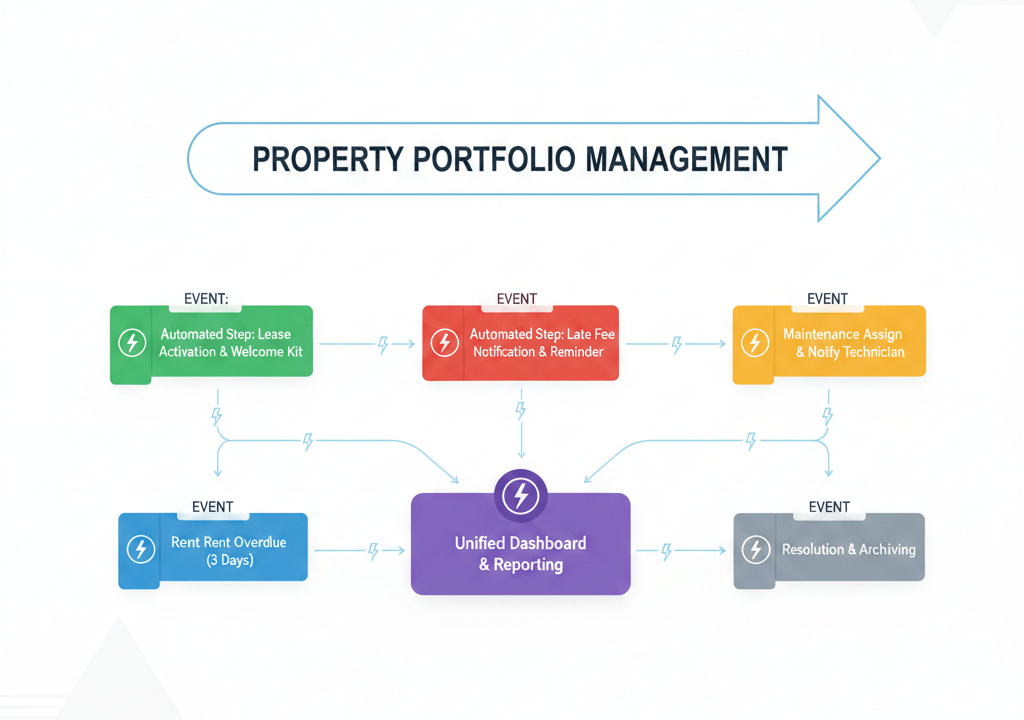
Traditional property operations run on checklists: staff remember (or are reminded) to do tasks at certain times—end of month, move‑in, move‑out, inspection cycles. That works at small scale, but as portfolios grow, relying on people “remembering the list” becomes risky. An event‑driven model flips this: real‑world events inside your portfolio automatically trigger the next steps, so work moves forward without waiting for manual coordination.
For large portfolios, this shift from static checklists to dynamic triggers is what keeps operations fast, consistent, and scalable.
From Static Checklists to Live Triggers
Checklists are useful, but they have limits:
- They depend on someone checking them at the right time.
- They don’t react in real time to what tenants, assets, or payments are actually doing.
- They’re hard to keep in sync across regions and teams.
An event‑driven approach starts with the key events in your operation—“new application received,” “lease signed,” “rent overdue,” “ticket created,” “inspection due,” “lease expiring”—and defines what should happen automatically after each one.

Examples of Event-Driven Flows
A few simple patterns illustrate the idea:
- New tenant application submitted
Trigger: application received
Actions: create prospect record, start KYC workflow, notify leasing team, set follow‑up task. - Lease signed
Trigger: status changes to “signed”
Actions: generate welcome email, create first invoice, open move‑in checklist, notify operations and security for access setup. - Rent becomes overdue
Trigger: invoice passes due date with no payment
Actions: send automated reminder, flag account in collections view, optionally notify property manager if overdue beyond a threshold. - Maintenance ticket created
Trigger: tenant logs an issue
Actions: assign to the right team/vendor based on category/location, set SLA timers, send confirmation to tenant. - Lease expiry approaching
Trigger: 60/30/15 days before end date
Actions: create renewal task, send options to tenant, alert manager if no response.
In each case, the system moves work to the next stage as soon as something happens, instead of waiting for someone to remember.
Benefits at Portfolio Scale
For large, multi‑asset operations, event‑driven design brings three main gains:
- Consistency – The same type of event triggers the same actions everywhere, reducing variation in service quality across buildings and regions.
- Speed – No lag between something happening (like a late payment or a new ticket) and the first response.
- Visibility – You can see how many events are waiting at each step (e.g., new applications, unassigned tickets, pending renewals) and manage bottlenecks.
Managers stop micromanaging tasks and start managing flows.
Designing Your Event-Driven Blueprint
To get started, you can:
- List your key events
Cover the full lifecycle: prospect → tenant → operations → exit. Identify 15–20 events that matter most (application, approval, sign, move‑in, payment, overdue, ticket, inspection, expiry, etc.). - Define “next actions” for each
For every event, ask: what should always happen immediately after this, in a good operation? - Turn actions into rules and workflows
Configure your system so those actions (tasks, notifications, document generation, status changes) happen automatically. - Add SLAs and monitoring
Attach time targets to key events (e.g., respond to new ticket within X hours) and track whether your operation hits them. - Refine as you learn
As patterns emerge, adjust triggers and actions to match reality and strategy.
Operations That React in Real Time
Checklists will always have a place, but at portfolio scale, they’re not enough on their own. An event‑driven operations model lets your organization react in real time to what tenants, assets, and finances are doing—without depending on manual memory and constant chasing. The result is an operation that feels lighter to run, more predictable to investors, and more responsive to residents.